


WebCargo Tracking, Delivery & Contact Info
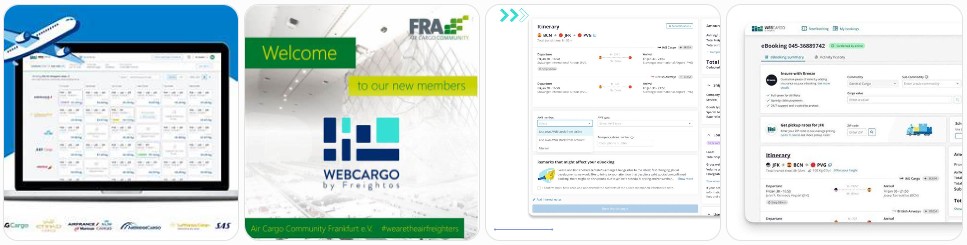
WebCargo is a digital freight pricing, booking, payment, and shipment-management platform founded in Barcelona in 2008. It became part of Freightos in 2016 and now connects freight forwarders with airlines and other transportation providers worldwide. Rather than operating delivery vehicles or aircraft, WebCargo helps logistics professionals compare rates, reserve cargo capacity, create air waybills, manage bookings, and monitor eligible air and ocean freight shipments online.
How to Track WebCargo Package (Where is my WebCargo package?)
Track WebCargo Package & Parcel Here
WebCargo account holders can monitor eligible freight bookings through the platform. Tracking availability and status details depend on the airline, carrier, route, and booking integration.
1. Open the official WebCargo login page in your browser.
2. Sign in using the business email address and password connected to your WebCargo account.
3. Open the booking, shipment, or eBooking management area from your account dashboard.
4. Search using the WebCargo booking reference, master air waybill number, house air waybill number, airline booking reference, or other available shipment identifier.
5. Select the correct booking to view the latest carrier-supplied shipment information.
6. Review available milestones such as booking confirmed, cargo received, departed, transferred, arrived, available for collection, or delivered.
7. Check the listed airline, ground handler, freight forwarder, or final delivery provider when more detailed tracking is required.
8. Use the carrier’s official tracking page and enter the air waybill number when WebCargo displays only limited shipment information.
9. Confirm that the air waybill number has been entered correctly. Air waybill numbers commonly contain an airline prefix followed by a serial number.
10. Contact your freight forwarder or the airline operating the shipment if no tracking events appear, the shipment is delayed, or the status has not changed.
WebCargo is primarily designed for freight forwarders, carriers, and logistics companies. A recipient waiting for an ordinary consumer parcel may not be able to sign in or track it directly through WebCargo. In that situation, the recipient should request the carrier name and tracking or air waybill number from the seller, shipper, or freight forwarder.
WebCargo Delivery Times & Schedule
WebCargo does not physically transport or deliver cargo, so it does not publish one standard delivery schedule. Transit time is determined by the airline, origin and destination airports, route availability, customs clearance, ground handling, cargo type, and any final-mile delivery company. Direct airport-to-airport shipments may move within one or several days, while shipments involving connections, customs inspections, restricted cargo, or remote destinations may take longer. The WebCargo platform can be accessed online at any time, but booking confirmation, cargo acceptance, warehouse service, collection, and delivery remain subject to the operating hours of the selected carrier and facility.
WebCargo Weekday Hours: The online platform is generally accessible 24 hours a day. Airline offices, cargo terminals, warehouses, customer-support teams, and delivery partners usually operate according to their own Monday-to-Friday schedules.
WebCargo Weekend Hours: Online account access may remain available on Saturdays and Sundays. Weekend cargo processing, pickup, customs clearance, and delivery depend on the airline, airport, warehouse, destination, and service purchased.
Shipment schedules displayed during booking should be treated as planned transportation schedules rather than guaranteed door-to-door delivery appointments. Flight changes, weather, congestion, customs examinations, documentation problems, capacity restrictions, and operational disruptions can affect arrival times.
For the most accurate estimated arrival time, check the active booking in WebCargo and confirm the schedule directly with the operating airline or freight forwarder.
WebCargo Contact & Customer Service Info
WebCargo provides online sales and support channels for freight forwarders, carriers, and business users. Shipment-specific problems may also need to be handled by the booked airline or forwarder.
• Phone number: WebCargo does not prominently publish one universal customer-service phone number on its official contact page. Existing customers should use the support options shown inside their account.
• Email: Sales inquiries can be sent to [sales@webcargonet.com](mailto:sales@webcargonet.com). Registered users can also contact [support@freightos.com](mailto:support@freightos.com) for platform assistance.
• Contact form: Use the official WebCargo contact form to ask about products, account access, research, technical issues, or other business questions.
• Mailing Address: Web Cargo, S.L.U., Avenida Diagonal, 211, 10th Floor, 08018 Barcelona, Spain.
• Social Medias: Follow WebCargo on LinkedIn, X/Twitter, and YouTube.
When contacting support, provide your company name, account email address, WebCargo booking reference, airline name, air waybill number, route, shipment date, screenshots, and a clear explanation of the problem. Do not include payment-card details or account passwords in an ordinary email.
For cargo delays, missing freight, customs holds, cargo damage, warehouse release problems, or delivery appointments, contact the freight forwarder or carrier responsible for the shipment. WebCargo supplies booking technology, but the physical shipment remains under the control of the participating logistics providers.
WebCargo FAQ
Is there a WebCargo location or branch near me?
WebCargo does not operate a public network of parcel shops, collection counters, or shipping branches. It is an online business-to-business freight platform. Use the official WebCargo contact page to reach the appropriate sales or support team. Physical cargo should be taken to the airline terminal, warehouse, or freight-forwarder facility specified in the booking.
Can WebCargo ship or deliver to a PO Box?
WebCargo itself does not ship or deliver freight. Whether a shipment can be addressed to a PO Box depends on the freight forwarder and final-mile carrier. Air cargo normally requires a physical consignee address, airport facility, commercial warehouse, customs broker, or approved collection location. Confirm the address requirements before booking.
Can I pick up WebCargo package?
Pickup may be possible from an airline cargo terminal, bonded warehouse, freight-forwarder facility, or another approved location, but it is not collected from WebCargo. The consignee may need identification, an air waybill, cargo-release documents, customs clearance, proof of authorization, and payment of storage or handling fees.
What time does WebCargo open? (WebCargo Opening Hours)
The WebCargo online platform can generally be accessed at any time. Sales and support representatives operate according to regional business hours. Cargo-terminal, airline, warehouse, and delivery hours vary by country and facility, so users should confirm operating times with the provider handling the physical freight.
Does WebCargo deliver or pickup on Sunday or Saturday?
WebCargo does not directly perform deliveries or pickups. Some airlines, airports, warehouses, and trucking providers process cargo on weekends, while others offer only limited service or require advance arrangements. Weekend availability should be confirmed with the booked carrier or freight forwarder.
Is WebCargo a courier or shipping company?
No. WebCargo is a digital freight technology platform that connects freight forwarders and carriers. It helps users compare rates, obtain capacity, make eBookings, create documentation, process eligible payments, and track supported shipments. The selected airline, ocean carrier, trucking provider, forwarder, or warehouse performs the physical transportation.
Can individual consumers use WebCargo?
WebCargo is primarily intended for freight forwarders, airlines, carriers, and logistics technology partners. Some services require a business email address, and certain air-cargo features may require IATA or CASS registration or an authorized relationship with a registered forwarder. Importers and exporters may be directed to Freightos services instead.
What is a WebCargo tracking number?
There may not be a separate consumer-style WebCargo tracking number. Users commonly locate shipments using a WebCargo booking reference, an airline confirmation number, a master air waybill, a house air waybill, or another carrier-issued identifier.
What is an air waybill number?
An air waybill, commonly abbreviated as AWB, is a transport document and shipment identifier used for air cargo. A master air waybill is normally issued by the airline, while a house air waybill may be issued by a freight forwarder for an individual consignment.
Why is my WebCargo shipment not updating?
Tracking may not update because the airline has not transmitted a new milestone, the cargo has not been physically accepted, the air waybill was recently created, the carrier does not support full tracking integration, or the number was entered incorrectly. Check the airline’s tracking system and contact the forwarder if the status remains unchanged.
Why does my WebCargo booking show “confirmed” but no movement?
A confirmed booking usually means cargo capacity has been reserved. It does not necessarily mean the freight has been delivered to the airline, accepted at the terminal, loaded onto an aircraft, or departed. Check the cargo cutoff time and confirm tendering with the shipper or forwarder.
What does “cargo received” mean?
“Cargo received” generally means the airline or handling agent has accepted the freight at the departure facility. Additional security checks, document verification, build-up, customs procedures, and flight loading may still be required before departure.
What does “departed” mean in WebCargo tracking?
“Departed” normally indicates that the shipment or applicable flight has left the origin or transfer airport. For connecting routes, the cargo may still need to pass through one or more intermediate airports before reaching its final destination.
What does “arrived” mean?
“Arrived” usually indicates that the cargo has reached the listed airport or facility. It does not always mean the shipment is cleared through customs, available for pickup, transferred to a delivery provider, or delivered to the consignee.
What does “available for pickup” mean?
This status generally means the cargo is ready for release or collection from the designated facility. The consignee may still need customs clearance, delivery orders, identification, authorization documents, and payment of applicable duties, storage, handling, or terminal fees.
Does WebCargo provide door-to-door delivery?
WebCargo may display or support freight services offered by participating providers, but it does not operate its own door-to-door delivery fleet. The exact service depends on the carrier or forwarder selected during the quotation and booking process.
Can I change or cancel a WebCargo booking?
Eligible users may be able to request a modification or cancellation through their WebCargo account, depending on the carrier and booking status. Airline rules, cutoff times, cancellation fees, no-show charges, and rate conditions may apply. Contact the carrier or WebCargo support promptly when changes are required.
Can I change the delivery address after booking?
Address changes must be approved by the freight forwarder and any affected carrier. Changes may require revised documents, customs updates, additional transportation charges, or cancellation and rebooking. Do not assume that editing an internal reference automatically changes the physical delivery instructions.
What should I do if my WebCargo shipment is delayed?
Check the booking for schedule changes and identify the operating airline. Then contact the freight forwarder or carrier with the air waybill number, origin, destination, flight details, cargo description, and expected arrival date. Ask whether the delay is caused by capacity, weather, customs, documentation, handling, or a missed connection.
Who should I contact about damaged or missing cargo?
Report the problem immediately to the freight forwarder, airline, warehouse, or delivery provider that had custody of the cargo. Preserve packaging, take photographs, obtain a written damage or shortage report, and follow the provider’s claim deadline. WebCargo support can assist with platform records but does not physically inspect freight.
Does WebCargo handle customs clearance?
WebCargo is not a customs authority or customs broker. Customs clearance is normally arranged by the shipper, consignee, freight forwarder, or appointed broker. Required documents may include a commercial invoice, packing list, air waybill, permits, certificates of origin, and commodity-specific documentation.
Can dangerous goods be booked through WebCargo?
Some participating carriers may accept dangerous goods, lithium batteries, temperature-controlled cargo, and other special commodities on supported routes. Acceptance depends on carrier rules, regulations, packaging, documentation, staff approval, and available aircraft capacity. The shipment must be declared accurately.
Does WebCargo guarantee the displayed delivery date?
No. Displayed schedules and transit estimates can change because of airline operations, capacity, weather, customs, security screening, cargo restrictions, airport congestion, documentation errors, or missed connections. Confirm critical deadlines with the forwarder and consider additional time for clearance and final delivery.
Can I track a shipment without a WebCargo account?
WebCargo does not provide a universal public tracking tool for every booking. A recipient without an account should ask the shipper for the airline name and air waybill number, then use the airline’s official cargo-tracking page or contact the responsible freight forwarder.
How do I find which airline is carrying my freight?
Check the booking confirmation, air waybill, commercial documents, or WebCargo shipment details. The first three digits of a master air waybill may identify the issuing airline, although the cargo can also move on partner or connecting flights.
Does WebCargo have a mobile app?
WebCargo has offered mobile access for eligible freight-booking users. App availability, supported features, and account permissions can vary. Users should follow official download links displayed on the WebCargo login page rather than downloading applications from unofficial websites.
How do I reset my WebCargo password?
Open the official WebCargo login page and select the password-recovery option. Enter the business email address associated with the account and follow the instructions sent by email. Contact support if the reset message does not arrive or the account is locked.
What should I include when contacting WebCargo support?
Include your company name, registered account email, booking reference, air waybill number, airline, shipment route, booking date, browser or device information, screenshots, error messages, and the steps that produced the problem. For shipment delays, also provide the most recent carrier status.
Is WebCargo the same as Freightos?
WebCargo is part of the Freightos Group. WebCargo focuses heavily on freight-forwarder and carrier tools such as rate management, quoting, booking, payments, and cargo tracking. Freightos also operates services intended for importers, exporters, customs customers, developers, and freight-market data users.
Summary
WebCargo is an online freight pricing, booking, payment, and shipment-management platform rather than a delivery carrier. Registered business users can monitor supported bookings through their accounts, while recipients may need to track directly with the airline or forwarder. Delivery times, pickups, weekend service, customs clearance, and cargo claims are controlled by the logistics providers handling the shipment.
Recent Articles
- Gulf Air Cargo Tracking, Delivery & Contact Info
- Network Airline Services Tracking, Delivery & Contact Info
- Chapman Freeborn Tracking, Delivery & Contact Info
- Air Charter Service Tracking, Delivery & Contact Info
- WebCargo Tracking, Delivery & Contact Info
- view all articles...
Popular Articles
 Australia Post Delivery Times & Schedule in My Area
 China Post Tracking, Locations Near Me, Contact & Hours
 Delhivery Tracking, Delivery & Contact Info
 Amazon Logistics UK Tracking, Delivery & Contact Info
 YTO Express Tracking, Delivery & Contact Info
 4PX Tracking, Delivery & Contact Info
 J&T Express Philippines Tracking, Delivery & Contact Info
 Ghana Post Tracking, Delivery & Contact Info
 SMSA Express Tracking, Delivery & Contact Info
 Myanmar Post Tracking, Delivery & Contact Info